Throughout 2026, the emulation of the legendary PlayStation 3 took a gigantic leap forward with RPCS3, the free emulator that managed to make eight out of ten PS3 games fully playable from start to finish on a PC, and that also runs better than on the original console. This was announced by the team on X with a message, originally in English, that left no room for doubt: “80% of ALL PS3 games are NOW PLAYABLE on PC!”
It is a highly notable advance when you consider that just a couple of months ago the figure hovered around 78%, and in January it barely surpassed 70%, illustrating the rapid pace at which this independent project is progressing. Today there are 2,855 PS3 games fully functional, with fewer titles that stall at startup, higher overall speed, and better support for peripherals such as the PlayStation Move and USB microphones.
What is RPCS3 and why is it so hard to emulate the PS3
RPCS3 is a free and open-source emulator that allows running PlayStation 3 games on computers running Windows, Linux, and macOS. Historically, the PS3 has been recognized as one of the consoles with the most complex architecture in the industry, mainly due to its Cell processor, which combined a main core with several special cores called SPUs, very different from those of any other device of the era. For that reason, for many years the community believed that emulating it smoothly on a regular PC was almost impossible.
However, the RPCS3 team managed to increase the precision with which it emulates the console’s processor and graphics card, making the program today much faster and more stable than in previous years.
Now, RPCS3’s compatibility list shows that games categorized as “Playable” have risen from 2,558 to 2,855 since January, while those that only reached the initial screen or the menu dropped sharply from 104 to just 25. According to OC3D, nearly the entire library of the console can at least start and display content on screen.
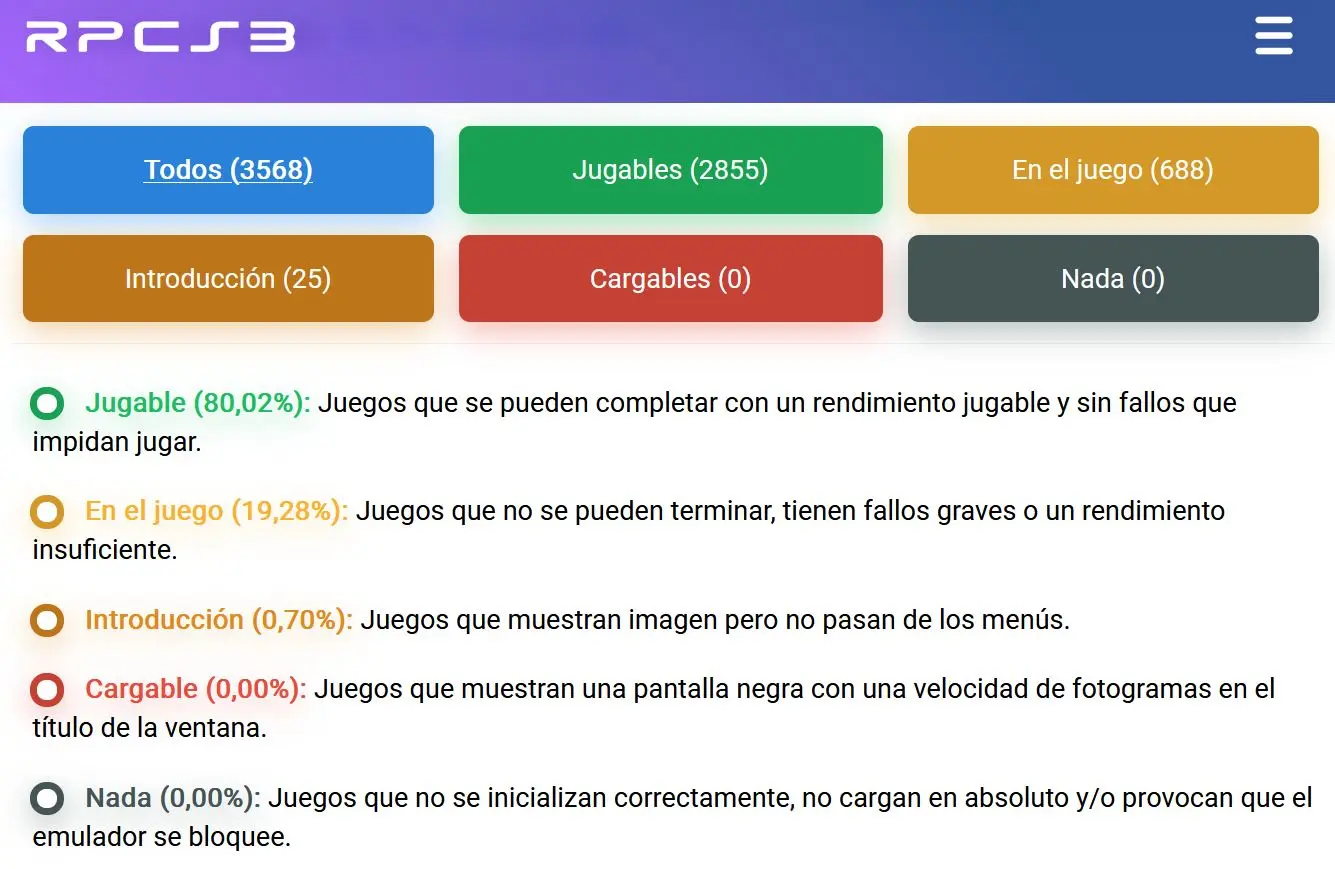
It is worth noting that for a game to receive the “Playable” rating, the emulator requires that it can be completed from start to finish without major errors, and that it runs better than the original PS3. For this reason, if a game runs but suffers from performance drops, it does not enter that category even if there are no visual errors.
This implies that the actual number of PS3 games you can enjoy is even larger if you have a powerful PC, or if you use the performance patches included by the emulator itself, such as the one that disables MLAA anti-aliasing used by many games on the console.
How to play PS3 games on PC with RPCS3
To use the emulator you need your own copy of the games, since RPCS3 does not include any, in addition to the PS3 firmware, which is downloaded for free and legally from the official PlayStation site.
- Download RPCS3 from its official site and unzip it into a folder.
- Download the PS3 firmware from the PlayStation site, linked in the RPCS3 getting started guide.
- Open RPCS3 and, in the File menu, choose Install Firmware to install the file you downloaded.
- Add your games from the File menu, selecting the folder or file of your copy.
- Check in the compatibility list the status of your game and the recommended settings, and double-click to start playing.
A promising future for the preservation of video games
One example of the above would be the Ratchet and Clank saga, whose games would have stopped crashing unexpectedly during play, but would still not be listed as playable because they require more powerful equipment to surpass the console’s performance.
All this work demonstrates that the RPCS3 team achieved an extraordinary feat, breaking barriers that seemed insurmountable a decade ago and salvaging thousands of classic games that previously depended on increasingly hard-to-find hardware. And if you prefer to play without an emulator, some console classics have even jumped to native ports, such as the PC port of PS3’s inFamous.
In the end, and with the team themselves indicating that more updates are coming before the year ends, players not only gain access to an almost complete library of classics, but also to increasingly faster emulation with compatibility for original peripherals—a huge step for the digital preservation of PlayStation 3.