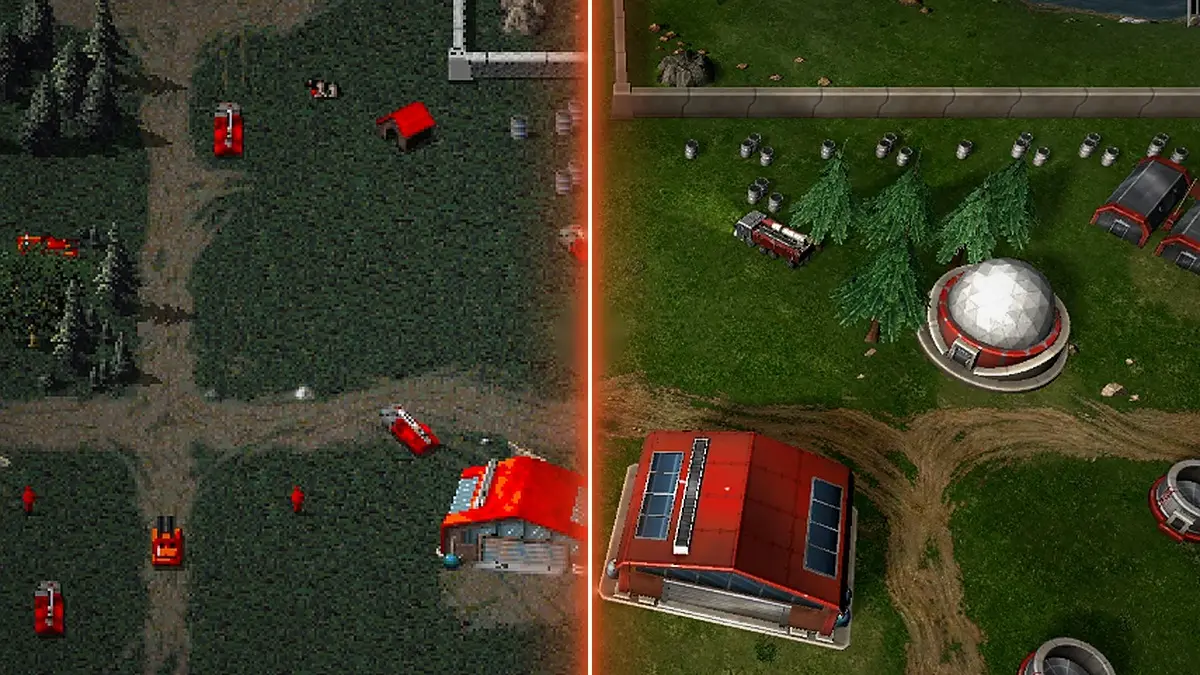
The free project OpenCNC3D released its 0.9.0 Alpha version, titled “Red Alert Arrives,” which adds RA3D, a remake that turns Command & Conquer Red Alert into 3D for PC and Mac using the original 1996 game code as its base, the same code that Electronic Arts released in 2020 under the GPL license. On top of that original logic, which keeps intact the rules for unit movement, combat, and pathfinding, the team built a new graphics engine with real-time lighting and shadows, explosions that illuminate the surroundings, smoke, debris and craters, and just one day later published version 0.9.2 “Field Repairs,” which adds 3D walls to the seven interior Red Alert missions and a second sun with independent lighting for buildings, vehicles, and infantry.
The big difference with other fan remakes is that RA3D can be played end-to-end, because it includes the complete campaigns for the Allies and the Soviets, with briefings, saved games, mission maps, and ending videos, in addition to a skirmish mode with the 24 multiplayer maps, up to seven computer-controlled opponents, and online matches with other players. Everything downloads for free and without creating an account, without needing the original game, because Red Alert has been freeware since 2008.
What Command & Conquer Red Alert in 3D brings
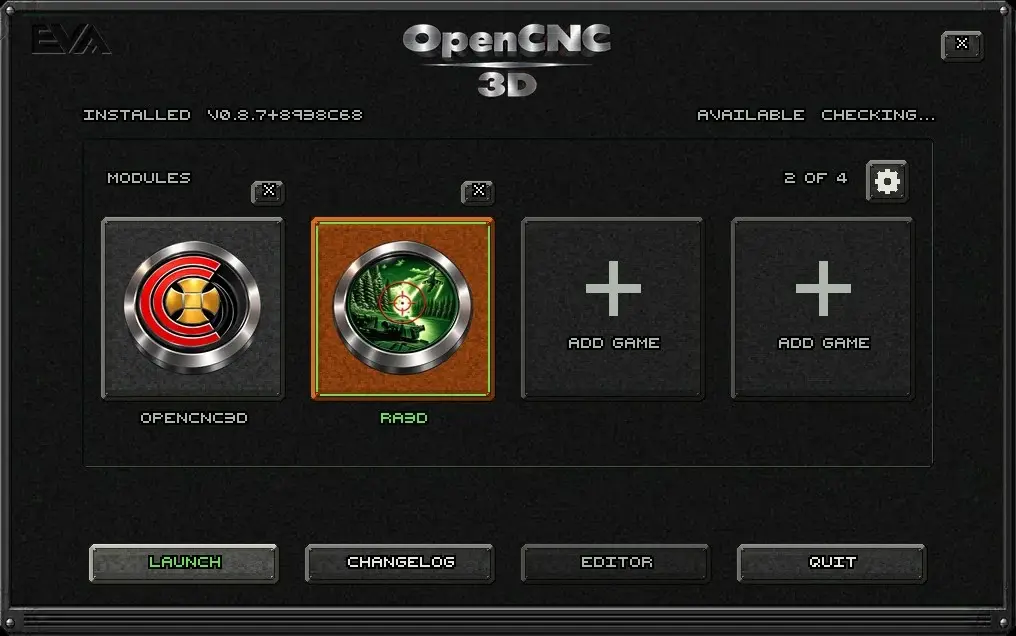
OpenCNC3D began as a PC recreation of Command & Conquer for the Nintendo 64, which at the time brought the saga’s first game to 3D graphics, and now the project is split into two modules within the same launcher, with Dawn3D for Tiberian Dawn and RA3D for Red Alert, each with its own saved games and options.
In the Enhanced graphical mode, buildings and vehicles feature animated 3D models that reflect what happens in the match, with factory doors opening, the Tesla Coil and the Iron Curtain in action, trucks picking up and unloading mineral, V2 launchers lifting and firing their rockets, planes with landing gear, and submarines diving. For nostalgic players, the game allows returning to the classic 2D whenever you want, and adds bloom adjustments, soft shadows, color correction, and even a CRT filter that mimics old tube screens.
An AI That Doesn’t Cheat
The 0.9.0 release also introduced a new AI for skirmish with four difficulty levels (Easy, Normal, Hard, and Expert), which deploys its MCV, builds its economy, explores the map, defends its base, coordinates attacks, and withdraws its damaged units. The interesting detail is that, according to its creators, no level cheats, because everyone plays with the same money, the same production speed, and the same line of sight as the player, with no free units or hidden rival information, and what changes between difficulties is how often it plans and how strongly it coordinates its assaults.
In skirmish games you can choose from eight factions, tech level up to 10, and starting money, as well as options like capture the flag, prize crates, and mineral regeneration, while multiplayer allows you to create or join games from a list and synchronizes the host’s settings so everyone plays under the same rules.
That said, it is an Alpha version, and the project’s own site shows they have 129 of 242 reported bugs fixed, i.e., 53%, and 46 of 115 features requested by the community delivered, so issues could still arise, and for now RA3D is available in English, German, and French, with no Spanish option.
How to download and install Command & Conquer Red Alert in 3D
- Visit the official site. Open opencnc3d.com from your computer and click the download button, where the window Download OpenCNC3D will appear.
- Choose your platform. Click Windows to download the file OpenCNC3DInstaller-windows-v0.9.2.exe, which weighs only about 3 MB because the game downloads afterward, or macOS if you’re on a Mac, and in both cases it’s free and you don’t need to create an account.
- Open the installer. Double-click the downloaded file and, if Windows shows the message “Windows protected your PC,” click “More info” and then “Run anyway.”
- Mark the videos and the music. During installation you’ll see checkboxes for the story videos and the music, and it’s wise to leave them checked if you want the full experience, although the game works without them and you can always add them later from the launcher’s gear icon.
- Add Red Alert. Open the OpenCNC3D launcher and, in the Modules section, click on one of the boxes labeled ADD GAME, with a plus sign, to open the module browser and choose RA3D, which downloads and is stored separately from the original Command & Conquer.
- Wait for the download. The launcher downloads the game and, if you marked them, the videos and the music, with a progress bar that can take several minutes depending on your internet speed.
- Open the game. When it finishes, click the RA3D tile, which is outlined in green, and press the LAUNCH button at the bottom-left to start the game, which defaults to the 3D Enhanced mode.
- Choose how to play. From the main menu you can start an Allied or Soviet campaign, set up a skirmish match against the computer, or join multiplayer to play with friends.
- Switch the graphical style. If you want to try the original 2D, go to the Graphics (Visuals) options from the menu or during a match and select the classic mode.