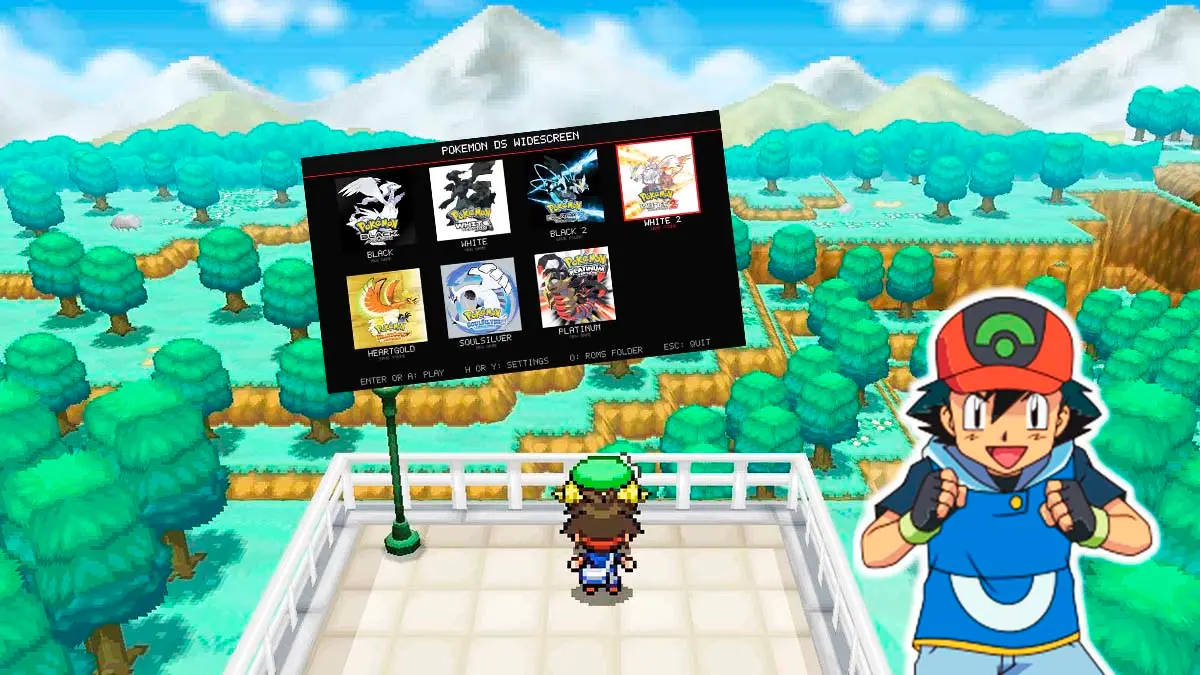
A developer released Pokémon DS Widescreen, a free tool for Windows and Linux PCs that lets you play seven DS Pokémon titles on a single 16:9 widescreen display, moving away from the classic two stacked screens format of Nintendo’s handheld console. The program relies on the integrated core of the melonDS emulator, and adds a layer that constantly detects what is happening in the game—such as which screen, menu, or battle you are in—to rearrange the image in real time, while the 3D world is drawn by the video card and stretched to the sides.
This tool, created by a fan of the series, brings together popular installments like Pokémon Black, White and their sequels, and thanks to the graphics card the three-dimensional environment scales up to 4K resolutions at 60 frames per second, twice the 30 of the original game, while keeping the characters and the text in pixel form with their classic look. The program is controlled with Xbox, PlayStation or Switch Pro controllers and with a keyboard, accepts saved games from other emulators such as melonDS and DeSmuME and requires the user to supply their own game files.
Visual Enhancements and Fluidity of DS Pokémon Games
As stated by the project’s creator, this program brings together in one place Pokémon White, Black, Black 2, Platinum, HeartGold and SoulSilver, making the three-dimensional world extend to the sides and look much wider and sharper thanks to the direct work of your graphics card.
It’s worth noting that this is not a ground-up remake or a native port, but a combination of the engine from a very well-known emulator with an intelligent layer that reconstructs the image, something achieved thanks to the prior community efforts that deciphered the original code of these DS Pokémon in decompilation projects such as Pret.
One of the major advantages of this version is that the graphical environment runs at 60 frames per second, generating intermediate frames between those of the original game while preserving the pixelated appearance of the characters and the text to maintain the nostalgic feel. All battle types, from single to double, triple and rotation battles, were adapted to look comfortable on a single monitor, with the touch buttons placed to the side of the screen so they do not obstruct the action.
In White 2 and Black 2, the system loads a larger portion of the map around the character so the screen edges do not look empty, while in HeartGold and SoulSilver the feature of seeing your companion Pokémon walking behind you is kept, now in widescreen.
On the other hand, the creator explains with full transparency that the project was built with the help of Claude, Anthropic’s artificial intelligence, and clarifies that all art, music and mechanics belong to the original games, while the complete source code is published on GitHub so anyone can review it.
Installation, Requirements, Options Menu, and Known Limitations
The download does not include any games, so each user must place their own copies of these DS Pokémon titles in the appropriate folder. To get it running you only need to follow these steps.
- Download the program. Go to the Pokémon DS Widescreen download page on GitHub and download the file pokemon-ds-wide-pc-windows-x86_64.zip if you are on Windows, or the Linux version if you use that system.
- Uncompress the file. Right-click the .zip, choose “Extract All,” and save it in any folder on your computer, but not inside Program Files.
- Add your games. Copy your game ROM files into the folder named roms, and if you want to continue a save from another emulator, place your .sav file in the saves folder with the game’s name, such as black2.sav or platinum.sav.
- Open the program. Double-click Pokemon DS Launcher.exe on Windows, or pokemon-ds-wide on Linux, and select the game from the list, where SAVE FOUND will appear if it detected your save.
- Dismiss the Windows warning. If Windows shows a warning about an unknown publisher the first time, click More information and then Run anyway.
Graphics Settings for DS Pokémon
Regarding the power requirements, the program runs on 64-bit Windows 10 or 11 or on recent Linux, without installing anything else, and to render the world with the graphics card it requires OpenGL 4.3, something that almost any card has since 2012. According to the creator, playing at 720p to 1080p suffices with almost any computer from the last eight years, even with integrated graphics; for 1440p a mid-range card such as a GTX 1060 or RX 580 is recommended, and for 4K a RTX 2070 or higher.
The configuration menu opens before playing or during the game with the Esc key or the Start button on the controller, and is divided into four sections.
- Display. Lets you choose the unified widescreen display or the two DS screens, adjust the size, enable borderless fullscreen, smooth the image, arrange the battle buttons and show the FPS counter.
- Graphics. Contains options to enable 60 FPS, the widescreen world, extended map loading, 3D resolution from 720p to 4K, automatic quality reduction if the system saturates, and rendering the world with the graphics card.
- Controls. Used to change keys or buttons to your liking, reassign the pause menu, configure fast-forward, or move the touch cursor with the stick.
- Shortcuts. Create desktop shortcuts, with the cover art of each game, to directly enter any of the seven.
Additionally, the pause menu allows saving and loading the game state at any moment, using cheats and enabling a fast-forward, which is achieved by holding the right trigger on the controller or the left Shift key.
Finally, among the known limitations, for now it only works with games in English version, which for Black, White and their sequels can be US or Europe versions, while Platinum, HeartGold and SoulSilver only accept the US version. There are also small visual glitches where map fragments appear and disappear at the screen edges in HeartGold and SoulSilver, and in Platinum the Poké Clock does not appear during normal gameplay, although it can be opened with the button to switch screens. The project also has versions for Mac, Steam Deck, modified Nintendo Switch, Android, iPhone and iPad, and its creator is already working on Pokémon Ruby Omega as a separate project.
