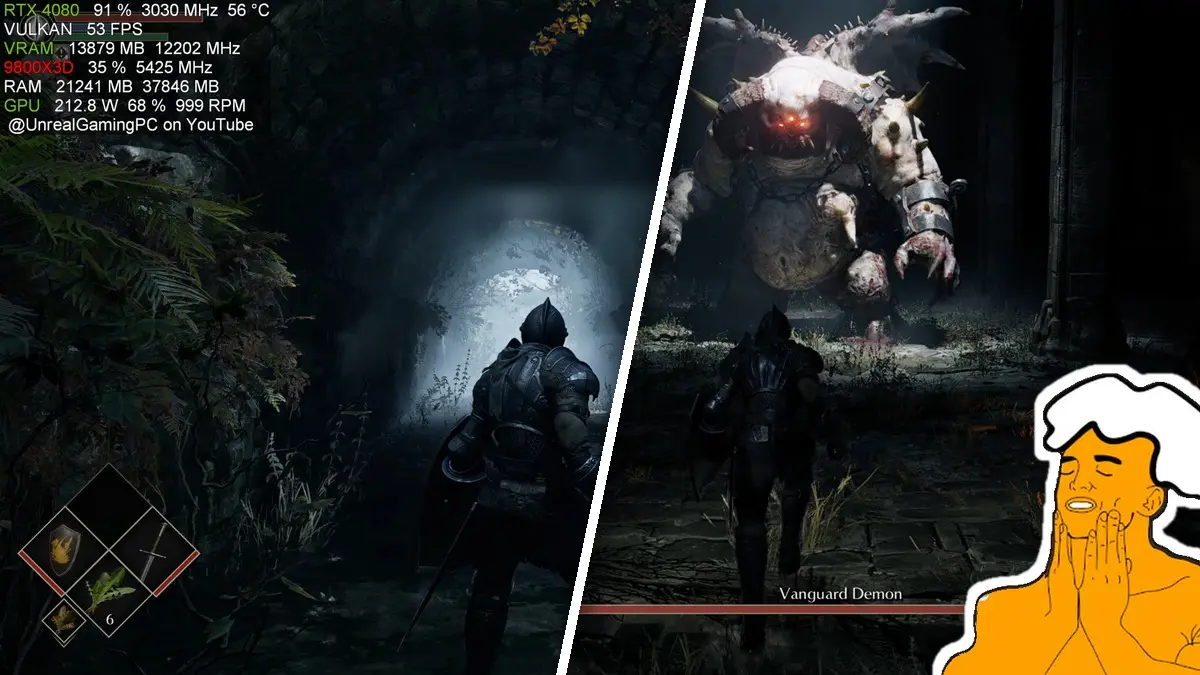
Demon’s Souls, the Bluepoint Games remake that released in 2020 as a PS5 launch title and which Sony initially refused to bring to PC after calling the trailer reveal a “human error,” runs on Windows with Regaliant. It is an unofficial port published by SulphurS16 on GitHub. It does not emulate the console’s CPU. It runs the game’s native x86-64 code, reimplements the PS5 system libraries, and draws the graphics with Vulkan. It adds DLSS, FSR, and XeSS, HDR, ultrawide 21:9 and 32:9 without stretching the image, fixed FPS at 30 or 60 or unlocked, and direct DualSense support via USB or Bluetooth without Steam.
On a Ryzen 9 5900X with an RTX 4090 it stays close to 60 FPS in many areas and drops to between 40 and 55 in the more demanding parts. To enter, you must pay a long toll. The first time you open it, the game runs in the background to precompile its shaders, for about an hour on that setup and nearly 80 minutes on an RTX 4070 SUPER. It also requires your own PS5 copy in version 1.07, with the executable and two decrypted libraries.
How Regaliant works
Regaliant is not an emulator like KyTy, which can also run Demon’s Souls on PC. The port takes the original PS5 program and makes it run on the PC’s processor, while the console’s functions are rewritten for Windows. It is open source under the GPL 3 license and does not bring data, code, or game keys. It does not decrypt anything, so each player must supply their own copy. It has no relation to Sony, Bluepoint Games, or FromSoftware.
The first public version, 0.1.0, released on November 23, and in less than a day it reached 0.1.2, a 95.6 MB ZIP. It adds a PC tab within the game’s own settings menu, with render scale, sharpness, geometry detail, shadow distance, texture filtering, bloom and vignette, and most changes apply instantly. It works with keyboard and mouse, with all keys configurable, and with Xbox and PlayStation controllers, each with its own on-screen buttons. It also features 5.1 and 7.1 sound, 3D audio for headphones with Windows Sonic or Dolby Atmos, and trophies converted into achievements with on-screen notification. Online mode is disabled.
What computer do you need to run it
Requires 64-bit Windows 10 or 11, a graphics card that supports Vulkan 1.3, and a processor with AVX2, i.e., an Intel from the Haswell generation (2013) or any AMD Ryzen. The speed of a single core is what weighs most on the FPS. Limited to 6 cores, the tested Ryzen 9 5900X retained between 91% and 94% of its performance.
Video memory makes the difference. With 12 GB or more the game fits entirely. Between 8 and 12 GB, some textures spill into RAM in loaded areas and FPS can drop. With 6 GB it still runs, and with 4 GB it renders the tested levels adequately, but in simulation it performed between 9 and 30 FPS on low quality. Below 4 GB is not supported. 32 GB of RAM is recommended, and with 16 GB there are no tests on real hardware.
On NVIDIA, the GTX 900 series and newer technically have the required features, though the GTX 10-series and older, just like Intel Arc A-series, add an extra shader pass that slows them down. The only card tested by its creator is the RTX 4090. AMD graphics cards have not been tested, and the RX 400, RX 500 and Vega could show visual errors.
RTX 50-series cards are also not tested, and on a RTX 5090, a RTX 5080 and a RTX 5060 Ti the startup tunnel showed black shapes, stretched geometry, or an almost black image. Version 0.1.2 includes a fix for those cards and also for AMD and Intel, though its creator acknowledges that he has not yet confirmed it on one of them. On those cards, the launcher re-prepares the shaders once.
How to install Demon’s Souls on PC with Regaliant
Before you start you need your Demon’s Souls copy for PS5 in version 1.07, with the eboot.bin, libc.prx and libSceNpCppWebApi.prx decrypted, and up to 5 GB free for shaders.
- Download Regaliant-0.1.2.zip from Regaliant’s releases page.
- Right-click the zip, choose “Extract All” and save it in its own folder, for example one called Games on drive C.
- Open regaliant-launcher.exe. If Windows warns that it protected your PC because the program is unsigned, click “More info” and then “Run anyway.”
- In the Game tab, press “Folder…” and choose the game’s folder. The launcher checks the files and warns if anything is missing.
- Press Play. The first time, the launcher starts a new hidden, silent match to prepare the shaders, and that takes about an hour on a fast computer. You can pause it and resume later. On a notebook, plug it in, because with battery this step is skipped.
To save space, the launcher can also compress the game into a .zar file that weighs about two-thirds of the original folder, using the “Compress to .zar…” button. The process took between 3 and 4 minutes on the test machine. The saved games and the settings stay in %APPDATA%Regaliant, so they are preserved when updating to a new version.
How to enable DLSS in Regaliant
FSR and XeSS work from the start, but DLSS requires an extra step because the port does not include the NVIDIA file.
- Get your own copy of the nvngx_dlss.dll file. It comes inside the installation folder of PC games that have DLSS.
- Copy it into the upscalers folder inside the directory where you extracted Regaliant.
- Launch the game, go to the PC tab in the settings menu, and choose DLSS as the anti-aliasing method.
All three systems use the game’s own motion vectors, so DLSS, FSR, and XeSS work with the original frame data of each frame.
What still fails in the port
Regaliant is an early version and no one has yet played the full game from start to finish. GameGPU ran it on a Ryzen 7 9800X3D with RTX 4080 and 64 GB of RAM, and even with that setup it encountered frequent hiccups and dips in performance.
Some uncommon effects and spells do not enter the initial precompilation and are compiled the first time they appear, so the first load of each level can pause for a moment. In windowed mode, 144 or 165 Hz displays stay at 48 or 55 FPS. To reach 60 or more you must use full screen or borderless with G-SYNC or FreeSync, or a 120 Hz monitor. HDR displays have not been tested either.
Mods and online in Regaliant’s future
Its creator published a roadmap with no dates and no promises. The first objective is to reach stable 60 FPS across the entire game, even in the most demanding areas, and then higher rates for high-refresh monitors. After that he aims to shorten shader preparation to eliminate it, compiling them in the background while you play and without stutters.
He also plans support for mods via a folder that replaces files without touching the original game. The biggest and most distant goal is online play, with messages, blood stains, co-op, and invasions through a community server.
Regaliant appears in the same week that the community is trying to bring GTA 6 to PC with unofficial ports, a race that today remains far from a game that can be played in full.
