Ports of PC versions without game emulators are continuing to arrive, allowing users of this platform—fans of console exclusives—who dreamed for years of seeing them on computers to finally witness it, as happened recently with Metroid Prime and God of War III Remastered. Now you can download the first public beta version of the PC port for Super Mario Galaxy, an unofficial adaptation that lets you play the Wii classic directly on the “master race,” without needing a conventional console emulator and with improved graphics.
The development has been carried out by the creator keepvaibin, who has been working on the project named Nebula since June, using the programming agents of Claude, Anthropic’s AI, and instead of emulation translates the Wii’s original code into C++ to compile it directly on your computer as a Windows program, achieving 60 frames per second as well as compatibility with keyboard, mouse and Xbox or Nintendo Switch controllers, the latter taking advantage of the original gyroscope and vibration. It should be noted that it has no relation to the decompilation being prepared by the Luma’s Workshop group and that the project does not include Nintendo’s files, so you need your own original copy of the game to install it.
Graphic options, controls, and performance of the PC port for Super Mario Galaxy
If you’ve never played it or have only heard about it, Super Mario Galaxy is one of the most acclaimed adventures in the Nintendo saga, originally released in 2007 for the Wii, where Mario travels through outer space to rescue Princess Peach from Bowser.
Unlike traditional platformers, this entry stands out for its innovative gravity-based gameplay, allowing you to run, jump, and explore freely around tiny planets, spheres, and galaxies filled with puzzles and enemies.
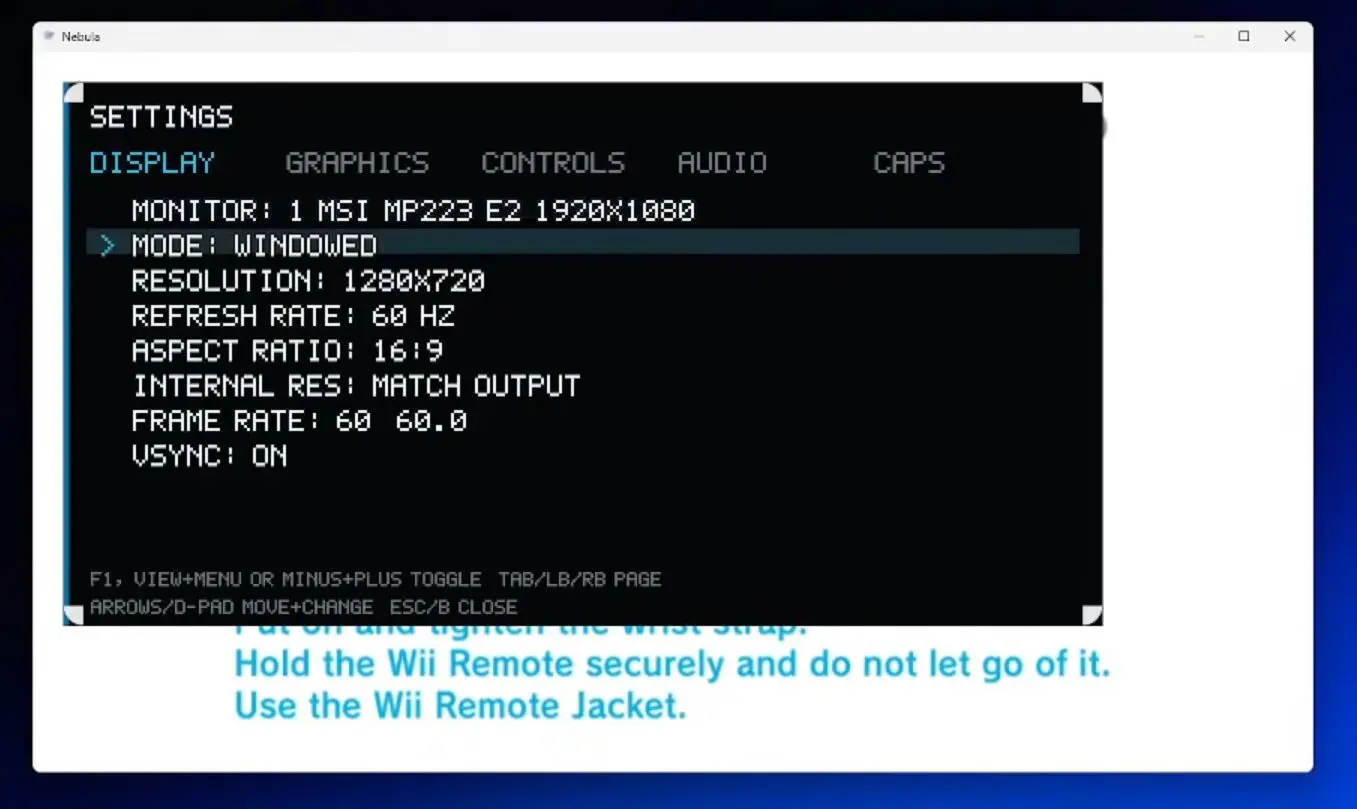
With a spectacular orchestrated soundtrack and level design packed with imagination, it instantly became a must-have classic of video games. Now arrives this PC adaptation, which features an internal settings menu that lets you customize the image and controls in-game without exiting to the main screen, and includes options such as internal resolution up to 16 times the original, support for ultrawide monitors, SMAA or FXAA anti-aliasing, AMD FSR 1 upscaling, and optional per-pixel lighting.
To access this menu you simply press F1 if you’re on keyboard, View and Menu on an Xbox controller, or Minus and Plus on a Switch controller. If you’re playing with keyboard and mouse you can rebind all keys to your liking, while users with controllers benefit from detection for Xbox and Switch Pro Controllers connected by USB; the latter retain the original vibration and even the gyroscope for aiming just like with the Wii remote.
Quick installation guide for the PC port of Super Mario Galaxy
In terms of technical aspects and system demands, the game stands out for being exceptionally well optimized, because according to data from the developer you don’t need a powerful PC or a dedicated graphics card to achieve good performance, though you do need 64-bit Windows 10 or 11, DirectX 12 compatibility, 8 GB of RAM and 16 GB free during installation.
Tests conducted on an Intel Core Ultra 9 185H with integrated graphics demonstrate that the title is capable of sustaining a steady 60 FPS at 1440p, ensuring that almost any modern machine can run Mario’s space adventure smoothly, though the creator notes that this is a work in progress and some areas such as Gateway Galaxy may dip below 60 FPS on more modest processors.
And to install the PC port of Super Mario Galaxy on your system you simply need to follow these straightforward steps, remembering that it only works with the US version (code RMGE01) and that you must use your own original copy for the entire process.
- Go to Nebula’s download page on GitHub and download the installer Nebula-Setup.exe.
- Run the installer. If Windows SmartScreen shows the warning “Unknown publisher,” click More information and then Run anyway.
- Select your copy of Super Mario Galaxy in ISO, RVZ or extracted folder.
- Click Install so the program downloads its tools and compiles the game, which takes a few minutes and requires an internet connection.
- Open the game by searching for Nebula in the Start menu.
Thus, to close, you will be able to enjoy this PC port of Super Mario Galaxy that, as noted, offers a smooth 60 FPS experience by combining multiple graphics and control options with a remarkably easy installation process, and whose installer itself can be used to update, repair, or uninstall the game whenever you need.
